Share files now. Let them open later.
Updated
Give people the link before your files are ready to be seen. Attach a small package, choose an opening time, and share one countdown link.
Create your file link Basic is free within 7 days and 1 MB. Larger files, later dates, or Timelock are $3.
Send now, open later
Your launch is tomorrow. The announcement and screenshots are ready, and you want to put one link in today's posts. The files should stay closed until launch.
A Postdate link shows a countdown before opening. At the chosen time, recipients can read the message and download its attachments. You share the link yourself; Postdate does not email it or send opening notifications.
- Send later
- Schedule an email when you want the message to arrive later.
- Open later
- Share a Postdate link now when people should wait to access its contents.
- Expire later
- Choose how long the hosted content stays available after opening. This does not revoke downloaded copies.
Prepare your files
For a small product launch, use an announcement PDF and a ZIP of approved screenshots. Open both files before attaching them and keep your own originals.

Add a short message explaining the attachments:
The launch files are ready. The PDF contains the announcement, and the ZIP contains the product screenshots. Thanks for helping us share it.
Postdate accepts up to ten files. The message, files, packaging, and encryption must fit within 100 MB, so leave room below that limit. A large video master needs another delivery method.
Choose when the link opens
- 01Attach the package
Open Postdate, write your message, and choose Attach files. Add the PDF and ZIP. Check that both appear.
- 02Set the opening time
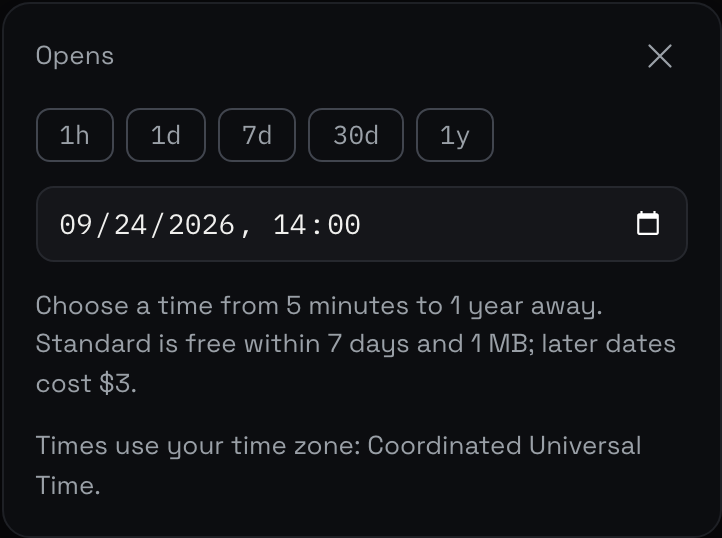
Choose Opens and set the date and time. Check the timezone shown in the picker. If your release is announced in UTC, convert it to that timezone before saving. Opening must be at least five minutes ahead.
- 03Set availability and lock
Choose Available for to set how long the content stays accessible after opening. Seven days is the default; the range is one hour to 30 days. Then choose Basic or Timelock and review the differences below.
- 04Review and share
Choose Review Postdate. Check the files, time, availability, and price before creating it. Copy the recipient link into your announcement. Keep any private delete link to yourself.
Choose Basic or Timelock
Basic
Postdate holds the key until opening. You receive a private delete link that works until expiry. This is useful when you may need to cancel the package and create a new one.
Timelock
The key is encrypted for a future release from the drand network. Access through the link depends on that release and the encryption remaining secure. You cannot delete it yourself or make it open early.
Both locks encrypt the content in your browser before upload. Opening depends on Postdate being available; Timelock also depends on drand. Keep the release time and these dependencies in mind. Read the Timelock explanation for the full trust model.
Basic is free up to 1 MB when it opens within 7 days. Timelock, more than 1 MB, or an opening date beyond 7 days is $3 USD per Postdate. The options combine into one payment, with up to 100 MB and an opening date up to a year away.
Rehearse the release
Create a separate test with harmless files and an opening time a few minutes ahead. In another browser, check the countdown, the opening, and both downloads. Then check the production link's time before sharing it.
- Send separate early-access files to anyone who must review the announcement or prepare a story before launch.
- Keep confidential details out of the public teaser. It is visible before opening.
- Check the date and timezone in the announcement as well as the link.
- Keep a fallback announcement and your original files if the release must move.
Photos and letters that open later
The same steps work for personal files. Attach photos to a birthday message, or add them to a letter that opens in up to a year.
Common questions
Can I share the link before the files open?
Yes. Early visitors see the countdown and any public teaser. The message, attachments, and filenames stay hidden until opening.
Does this schedule access to my original Google Drive file?
No. Download a copy you are allowed to share and attach it to Postdate. Your original Drive file keeps its existing permissions. If you need live collaboration or access limited to named recipients, use your existing sharing system.
Can I change the opening date?
You cannot move an existing Postdate's opening time. With Basic, delete it and create a replacement if plans change. Timelock cannot be deleted by the sender, so use it only once the release time is settled.
Do recipients need an account or have to pay?
They open the shared link in their browser. There is no recipient account or checkout. Anyone with the link can access the contents after opening, so share it with that in mind.
What happens after expiry?
The hosted content is no longer available through the link. Files people already downloaded remain theirs to keep. Expiry is not a way to erase their copies.
See examples for product launch files, press releases, and birthday surprises, or read how Postdate works.